Felipe Cortés ENES Hire me
Case study · Document automation

Invoices from email to Google Sheets. Nobody types them again.

Invoices arrive by email as PDFs, scans or phone photos. AI reads them, plain rules check them, a person approves each one, and the approved ones land in a spreadsheet with who approved them and when.

104 / 104test documents with every field read correctly
9 / 9traps caught: duplicates, wrong totals, wrong tax
0false alarms on the clean invoices
< US$ 0.001to read one invoice
The problem

Typing invoices is slow, and the mistakes are the expensive part.

Someone in accounts payable opens each email, downloads the attachment and copies vendor, number, dates, tax and total into a spreadsheet. It takes minutes per invoice and nobody enjoys it.

The real cost is what slips through: the same invoice sent twice, a total that doesn't add up, tax calculated wrong. A tired person approves it, and the money is gone.

Handing the whole job to an AI is not the answer either. A model that reads well can still be wrong, and a model must never be the one that decides to pay.

How it works

The AI only reads. Rules check. A person decides.

  1. It arrivesA PDF, a scan or a phone photo, by email or in a folder.
  2. It is readVendor, dates, lines, tax and total, copied as printed.AI
  3. It is checkedDo the lines add up? Is the tax right? Was it already sent?Rules
  4. It is approvedThe approver gets an email with the original and decides on one screen.Person
  5. It is filedOne row in Google Sheets or Excel, with who approved and when.
The review screen

Every alert brings its numbers.

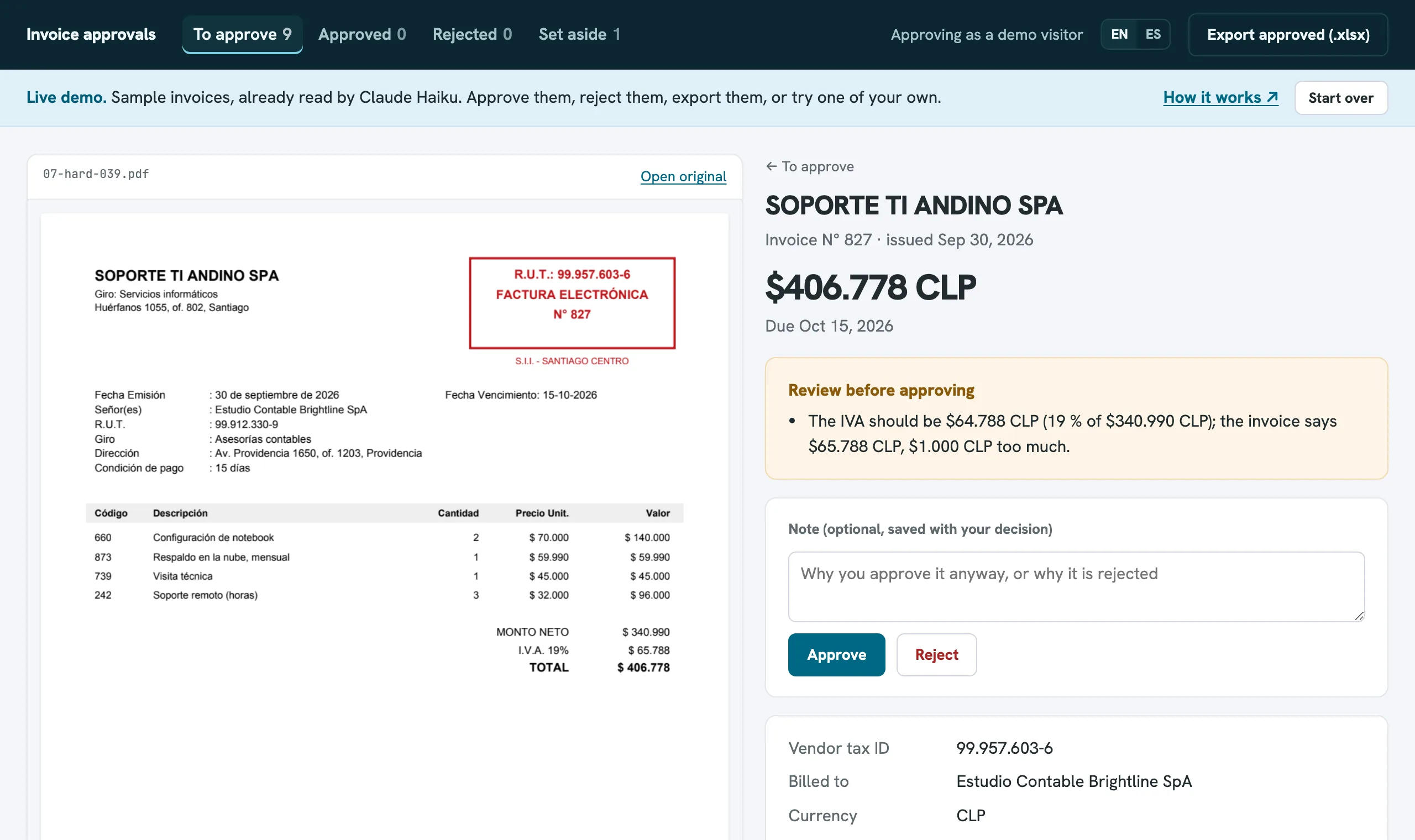
Review screen: the original invoice on the left, what was read on the right, and an alert saying the tax should be $64.788 CLP, not $65.788 CLP.
  1. The original, always in viewNobody approves from memory.
  2. What was readVendor, number, dates and total.
  3. The alert brings its numbersExpected, printed and the difference. No calculator needed.
  4. Approve or reject, with a noteThe decision and its reason go to the spreadsheet.
Where it ends

One row per approved invoice, in the spreadsheet you already use.

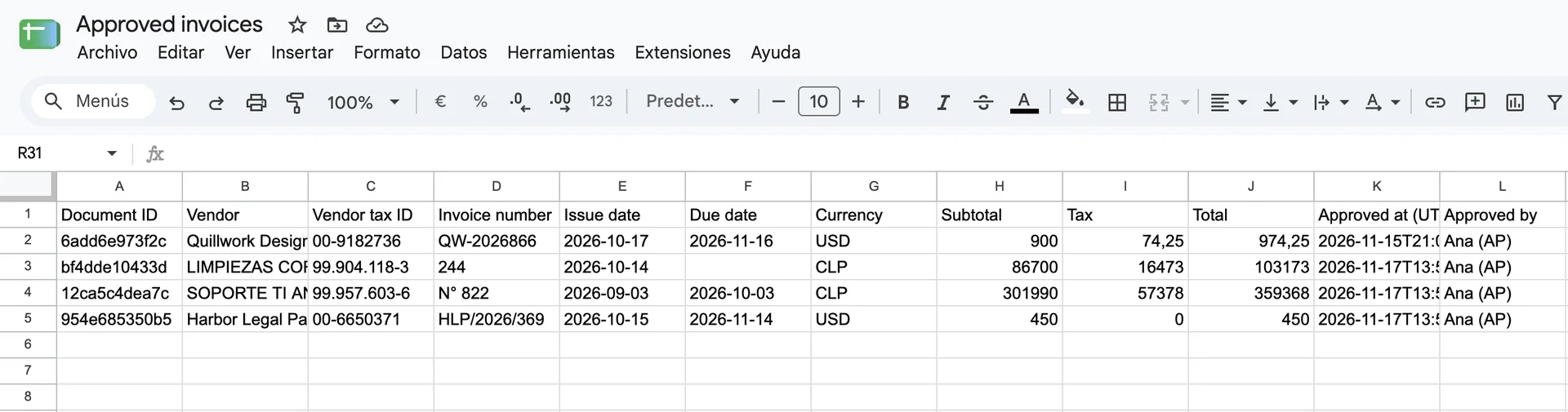
The Google Sheet: one row per approved invoice with vendor, tax ID, number, dates, currency, subtotal, tax, total, approval time and approver.

Each row carries a fingerprint of the original file, so running the sync twice never adds a row twice.

The hard cases

Phone photos are read. What isn't an invoice is set aside.

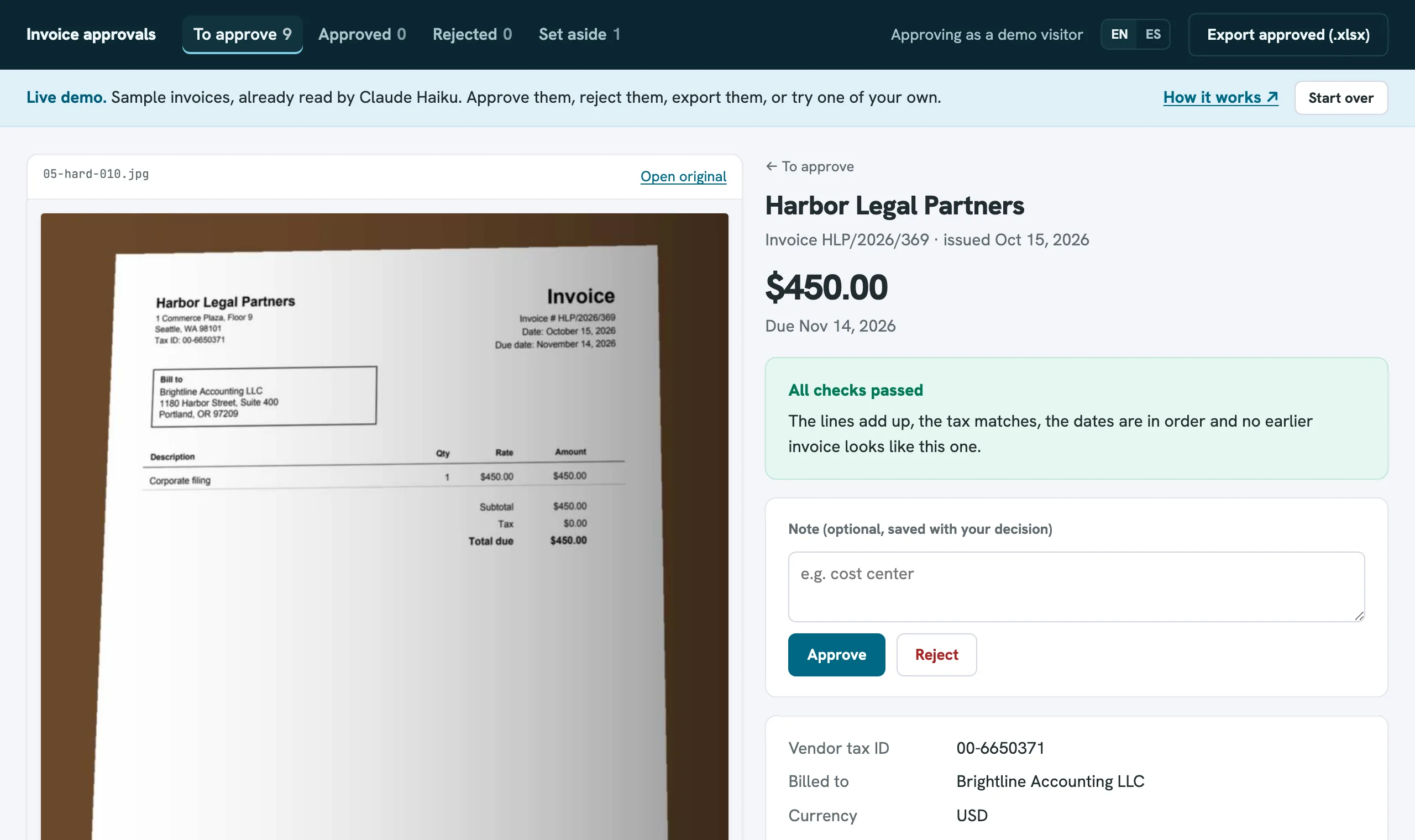
A phone photo of an invoice next to what was read from it: all checks passed.
A phone photo, read in 1.6 seconds for US$ 0.0004.
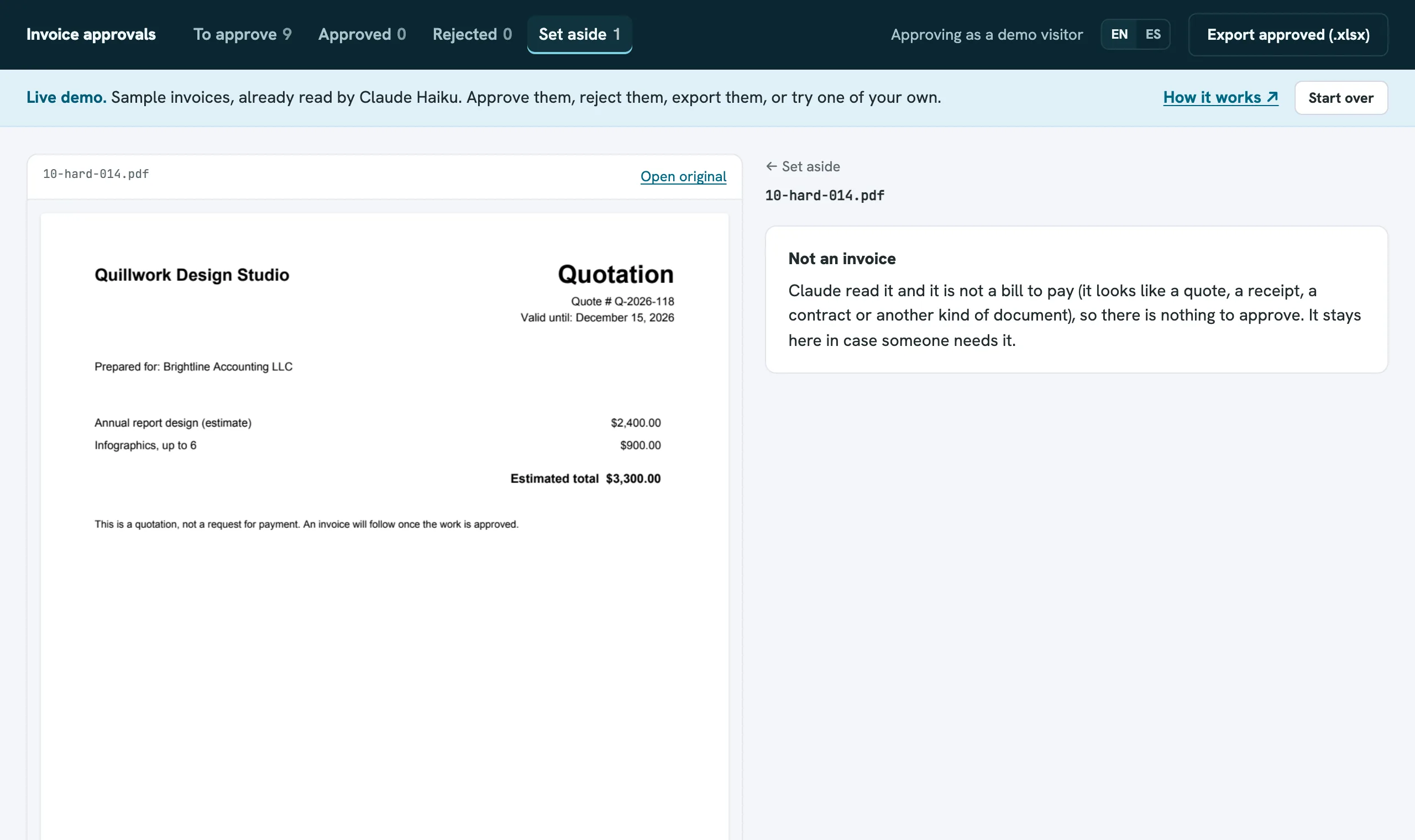
A quote set aside as not an invoice, instead of being read as one.
A quote is not an invoice. It goes to its own tab, with the reason.
How I know it works

Measured on 104 test documents, field by field.

Two banks of invoices with the right answer for every field: 60 standard (clean PDFs, scans, three layouts) and 44 hard (Chilean electronic invoices, phone photos, two-page invoices, documents that are not invoices). Every failure is printed in full, not just counted.

1,204 / 1,204fields read correctly
9 / 9traps caught
0 / 91false alarms

The cheapest model was enough.

Cost per invoice on the standard bank. All three read every field right.

  1. Claude Haiku (chosen)US$ 0.0005
  2. Claude SonnetUS$ 0.0088
  3. Claude OpusUS$ 0.0177

About US$ 0.50 to 0.70 per thousand invoices, roughly 1/30 of the largest model.

The limit of this measurement. The 104 test invoices are computer-generated, so their text is crisp even when photographed. Handwriting, faded receipts or several invoices in one PDF are measured with your own documents: that is the first week of any project.
For your project

What you get

Starter · 5 daysUS$ 150One document type, from a folder to Sheets or Excel, with total and duplicate checks.
Standard · 10 daysUS$ 350Plus: reads a Gmail inbox, approval email with the original attached, alerts when something fails.
Advanced · 15 daysUS$ 700Plus: review screen, Excel export, weekly summary, deployed on your server or cloud.
Technical detail

Stack. Python, Claude API with structured outputs, Gmail API, Google Sheets API, SQLite, FastAPI for the review screen, openpyxl for Excel. 51 automated tests run on every push.

The model reads, rules judge. The model fills a fixed schema with the values printed on the page and is told never to fix the arithmetic. Line totals, subtotal, tax rate (Chilean IVA 19 %), dates and currency are checked by plain rules.

Duplicates across batches. The same invoice sent twice, even as a new scan or photo, and the same charge under a new invoice number.

Safe approval emails. The email carries the original and a link to the review screen, never approve or reject links of its own: mail scanners open links, and a scanner must never approve a payment.

Idempotent everywhere. A file is read once (content hash), an approval email is sent once, a row reaches the sheet once.

Never fails silently. Unreadable files go to their own tab and an alert goes out by email.

Limits today. Up to two pages per invoice, one invoice per file. In production the review screen sits behind the client's login.
Send me five sample documents.

I'll tell you what can be automated, how it would be measured and what it costs. In writing, no call needed.